Never pay a stranger by mistake
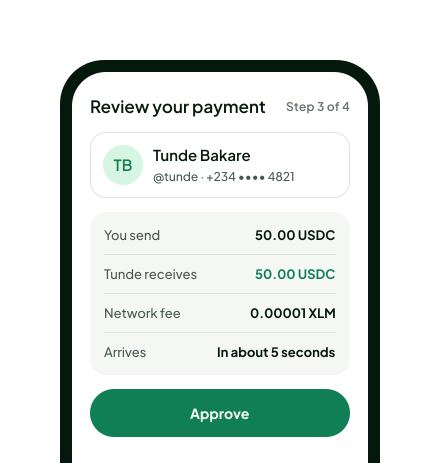
Before you approve, you see the person’s verified name, @handle and part of their number. If it’s not them, you stop.
KO
Kemi Ojo
@kemi · +234 •••• 1907
VerifiedIs this who you’re paying?
Type a friend’s @handle or phone number, see their real name, and send. Your money arrives in seconds and never leaves your own wallet until you say so.
Set up in about two minutes · Built on Stellar
The old way: paste and hope
GBX7QW2KJ52PNT4HVCARDLE3MU
A6YES5WQKJQ7QBR5NHTVGYGE4LQ
W2K
One wrong character and the money is gone.
The Pingly way: @tunde
Tunde Bakare
Verified
Tunde has it
50.00 USDC · 5 seconds later
Runs on the Stellar network
Works with the Freighter wallet
Moves USDC, a digital US dollar
Pingly takes the scary parts out of sending digital dollars: long addresses, guessing who’s on the other end.
Before you approve, you see the person’s verified name, @handle and part of their number. If it’s not them, you stop.
Kemi Ojo
@kemi · +234 •••• 1907
VerifiedIs this who you’re paying?
Pingly never holds your money or your keys. Your USDC sits in your own wallet, and nothing moves until you approve it there.
You approve every payment in Freighter
Pingly never sees your secret key
Payments settle in about five seconds, any day, any hour. No cut-off times, no waiting for working days.
Each payment carries Stellar’s network fee of 0.00001 XLM. What you send is exactly what they get.
You send
50.00
USDC
They get
50.00
USDC
Share your @handle, your number, a link or a QR code. Even people who aren’t on Pingly can pay you.
Every payment shows plainly as completed, waiting or failed, with a receipt you can check on Stellar.
To Ifeoma · 25.00
CompletedTo Kemi · 120.00
WaitingSet up once in about two minutes. After that, paying someone takes three taps and one approval.
Pick your @handle
@ada
@ada is yours
Enter your phone number, type the code we text you, and pick an @handle people will remember.
Freighter
Pingly wants to link this wallet and let it hold USDC.
Link the Freighter wallet you already use. One approval proves it’s yours and gets it ready for USDC.
@tunde
Tunde Bakare
50.00
Search an @handle or number, check the name, enter the amount and approve. They have it in seconds.
Settle up before the bill hits the table. Just their @handle.
Use the number already in your contacts. They see it in seconds.
Put your Pingly link on your invoice. Clients pay, you get a ping.
Everyone pays their part by name, and history shows who’s done it.
Your money stays in your wallet, and you always see who you’re paying.
No. Your USDC stays in your own Stellar wallet. Pingly links your number and @handle to your wallet address so people can find you. Every payment is approved by you, in your wallet, and Pingly never sees your secret key.
Create an account with your phone number, choose an @handle, then connect a Stellar wallet such as Freighter. You’ll need USDC in the wallet to send payments.
Stellar network fees are a fraction of a cent and are paid in XLM. Pingly shows the fee before you approve a payment.
Before you approve, Pingly shows the recipient’s verified name and handle so you can check who you’re paying. Stellar payments are generally final once approved.
USDC is a digital US dollar designed to stay close in value to one US dollar. On Pingly, it moves over the Stellar network.
Yes. Share your wallet address or payment link with someone outside Pingly. Their payment can still arrive in your Stellar wallet.
Your phone number helps people find and verify you on Pingly. We only show a masked number in payment confirmation details.
Pingly sends USDC to and from Stellar wallets. Converting USDC to local currency or withdrawing to a bank depends on the wallet or exchange service you use.
Claim it now and the next person who pays you won’t need a 56-character address.